


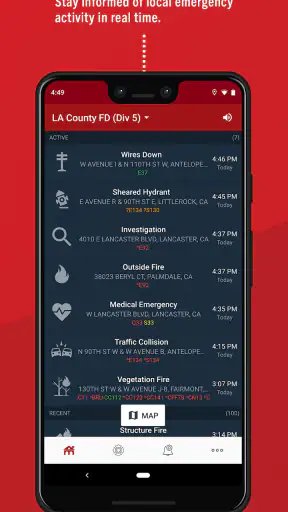
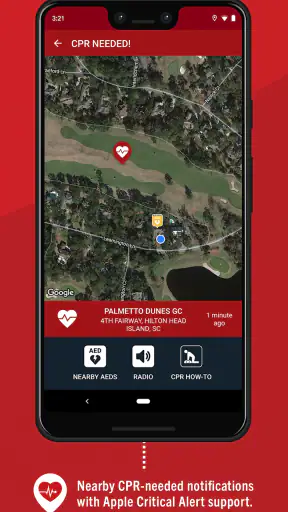
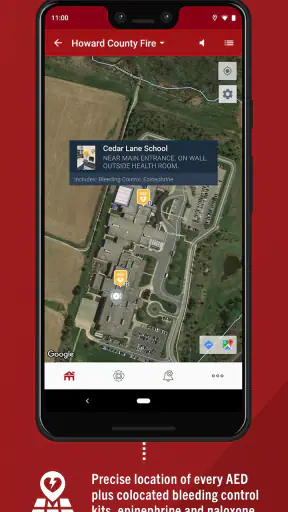
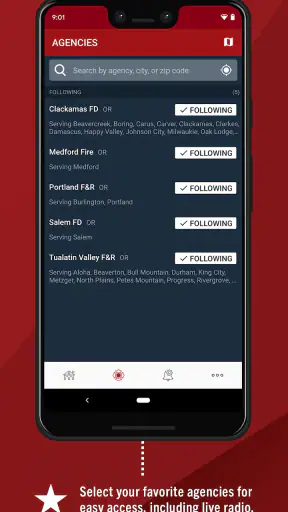
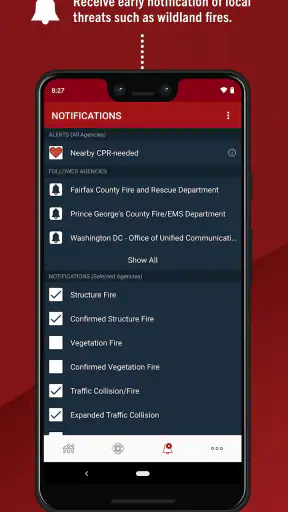
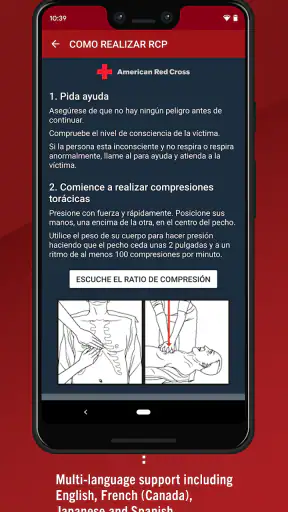
PulsePoint Respond is the kind of medical app I would rather have installed before an emergency than search for after one starts. Its purpose is focused: it connects people who may know CPR with nearby emergency situations where immediate help could matter. That makes it very different from an app that simply stores health articles or tracks personal symptoms. The value appears in the short gap before professional responders arrive, when a calm, capable person nearby may be able to do something useful.
I reviewed it with that practical question in mind: would I understand what it is for, would I notice an alert in a mobile setting, and would the experience remain useful when connectivity is imperfect? My overall impression is positive, but with an important qualification. This is not a replacement for emergency services, CPR training, or personal medical care. It is a community-response tool whose usefulness depends heavily on location, network access, alert attention, and the user’s willingness to act responsibly.
What PulsePoint Respond is really for
PulsePoint Foundation developed this free medical app for people who want to use CPR skills to help save a life. It is aimed at the moment when proximity matters more than convenience. If someone nearby is experiencing a serious cardiac emergency, a person with appropriate training may be able to begin assistance while formal help is on the way.
That focus gives the app a clear identity. It is not trying to be a digital doctor, a diagnosis engine, or a general wellness dashboard. I found that clarity useful because it changes how I think about the app: I do not open it casually to browse health content. I keep it available as a readiness tool, then pay attention when a relevant alert appears.
The app has been available since late 2011, and its current Android release is version 26.7.6707. It is rated for Everyone and requires Android 9 or later. Those details make it accessible to a broad range of phone users, although anyone with an older device should check compatibility before relying on it as part of an emergency plan.
Its store presence is substantial, with more than a million installs, an average rating of 4.6, and roughly thirty-four thousand ratings. I see those figures as signs that the concept has reached a meaningful audience, not as a guarantee that every user will receive the same experience. A response app can be valuable in one area and quiet in another, because local emergency coverage and nearby participation shape what appears on screen.
Why the local setting matters more than the download
The first thing I would explain to a friend is that installing PulsePoint Respond does not automatically turn every location into an active response network. The app’s usefulness is tied to the places and situations it can reach through its connected service. In a busy, covered area, an alert may feel immediately relevant. In another place, there may be fewer notifications or none that match the user’s position.
That is not necessarily a flaw in the app itself. It is a basic trade-off of a location-aware community system: the network has to exist around you for proximity to become useful. I would therefore judge the app by whether it is available and meaningful in my regular locations, rather than assuming that the install alone provides universal coverage.
This is also why I would not treat it as a substitute for calling emergency services. If I witness a collapse, I still need to follow the local emergency process and the instructions of dispatchers. PulsePoint Respond can complement that response by helping an appropriately trained nearby person recognize an opportunity to assist; it should not become an excuse to delay a call or ignore professional guidance.
How connectivity changes the experience
Connectivity is central to the app’s role. A nearby emergency alert is useful only if current information can reach the phone, and the phone can present it at the right time. That makes the experience different from a static CPR guide, where the main content can be read whenever the user chooses. Here, the most important moment is event-driven and time-sensitive.
I would pay particular attention to the conditions under which the phone receives notifications. A device with poor reception, restricted background activity, muted alerts, or an overly aggressive battery-saving mode may not behave like a phone with ordinary connectivity and notifications enabled. I am not saying the app promises a particular offline mode; rather, I would avoid assuming that a disconnected phone can provide the same timely alert experience as a connected one.
This leads to a practical habit: before an emergency ever happens, I would open the app in the places where I spend time and become familiar with its presentation. That does not guarantee an alert, but it helps me understand whether the service is active around me and whether the app is behaving normally. It is better to discover confusion during a quiet moment than while trying to decide whether an alert is relevant.
The most important limitation is not a missing button; it is the dependence on a live chain of location, connectivity, notification delivery, and human response. If any part of that chain fails, the app may be less useful even though the installation itself is fine.
Using it in ordinary mobile situations
Phones are rarely used from a perfect desk setup. I may be walking, commuting, shopping, visiting a public building, or moving between areas with different reception. That matters here because an emergency alert can arrive when I am distracted, wearing headphones, carrying bags, or unsure of the entrance and exact location around me.
For that reason, I would keep my expectations realistic. The app can make me aware of a possible nearby need, but it cannot remove the physical and personal limits of responding. I still need to decide whether I am close enough, trained enough, and able to help without putting myself or anyone else in danger. A notification is an invitation to assess, not an instruction to rush blindly into an unfamiliar situation.
A realistic example would be receiving an alert while in a shopping area. I might recognize the general location, check whether I am actually nearby, and consider whether I have the CPR knowledge to assist. If I choose to respond, I would follow emergency-dispatch instructions and the established scene-safety principles I learned in training. If I am far away, driving, caring for a child, or unable to reach the location safely, the responsible choice may be to leave the response to others.
That example also shows why a phone’s physical context matters. A small screen is convenient when I am already carrying it, but it is not the same as a dedicated emergency device. I would not want to stare at the display while crossing a road, driving, or moving through a hazardous area. The app supports awareness; it does not make multitasking during an emergency safe.
What I would do when an alert does not behave as expected
Every connected app needs a recovery mindset, especially one associated with urgent situations. If I do not see an expected alert, I would not assume that there is no emergency. I would continue using normal emergency channels and rely on direct observation, local instructions, and trained procedures. Similarly, if an alert appears late or seems unclear, I would verify the situation through appropriate emergency guidance rather than acting on guesswork.
For everyday reliability, I would check the basics first: whether the phone has a usable connection, whether notifications are allowed, whether location access is configured as intended, and whether the device has restricted the app in the background. I would also make sure I understand the phone’s sound and vibration settings. These are not glamorous checks, but they are more relevant to this app than repeatedly reinstalling it.
If the service is quiet, I would avoid interpreting silence as proof that it is broken. The local area may simply have no relevant activity or no active coverage at that moment. On the other hand, if the app repeatedly fails to refresh or notify while other connected services work normally, I would treat that as a reason to troubleshoot before depending on it.
Recovery also means knowing when not to continue. If I arrive at a scene that is unsafe, confusing, violent, or beyond my training, I should step back and follow professional instructions. PulsePoint Respond cannot assess hazards for me, perform CPR for me, or replace emergency responders. Its strongest role is helping a capable person become aware of a possible nearby opportunity, not turning an untrained bystander into a rescuer.
Using the app without wasting attention or data
Because this is a connected service, I would use it deliberately rather than constantly opening it and watching for changes. The app’s value comes from timely awareness, not from spending long periods browsing. A short familiarization session is more sensible than repeatedly checking the screen throughout the day.
On a limited mobile plan, I would still think about how I use any location-aware notification app. I would avoid unnecessary manual refreshing and rely on the phone’s normal notification behavior where appropriate. I would also remember that saving data is not the only consideration: restricting background connectivity too aggressively may undermine the very alert function I installed the app for.
There is a useful trade-off here. Battery-saving and data-saving settings can be sensible for ordinary apps, but an emergency-awareness tool may need a different priority. I would review those settings carefully instead of applying a blanket restriction. At the same time, I would not keep every possible alert or permission enabled without understanding what it does. A phone that produces too much noise can make genuinely important notifications easier to overlook.
My practical approach would be to keep the app installed, configure notifications in a way I can actually notice, and periodically confirm that my phone has not silently changed those settings after an operating-system update. I would not promise myself that a setting will remain untouched forever. Mobile systems change their background behavior, and personal habits change too.
This is one of the less obvious lessons of PulsePoint Respond: preparedness is partly a phone-maintenance task. The app may be free, but reliable use still requires attention to the device that carries it. A neglected phone, a disabled notification channel, or a dead battery can erase the benefit of an otherwise sensible installation.
Who will benefit most from it
I think the app makes the most sense for people who have current CPR knowledge, want to help in appropriate circumstances, and spend time in areas where the service is active. Healthcare workers, trained volunteers, workplace responders, and ordinary users who have taken CPR training may all find the concept meaningful, provided they understand their limits.
It can also be useful for someone who wants a gentle reminder that CPR skills are practical rather than merely theoretical. The app does not replace a course, but its purpose may encourage a user to take training seriously and think ahead about what they would do in a real emergency.
I would be more cautious recommending it to someone who expects a guaranteed alert in every location, wants step-by-step medical treatment for any condition, or is likely to respond without training. It is also not the right tool for someone seeking personal health monitoring, appointment management, medication reminders, or symptom interpretation. Those needs belong to different kinds of medical apps.
How it compares with the usual alternatives
Compared with a CPR reference app or a saved instructional video, PulsePoint Respond is more immediate but less self-contained. A reference tool is available for deliberate learning and may be useful when I want to review a technique. PulsePoint Respond is built around awareness of a nearby event, so its value depends more on live connectivity and local participation.
Compared with calling emergency services directly, it is supplementary rather than primary. A phone call connects the witness with professional dispatch and remains essential in an emergency. PulsePoint Respond may add a community layer, but it should never replace that first-line action.
Compared with a general health app, it is narrower and more purposeful. That narrowness is a strength when I want one clear emergency-response function, but it is a weakness if I expect a broad personal health toolkit. I would not choose it as my only medical app, and I would not install it expecting the feature set of a wellness platform.
The main advantage over a static alternative is the possibility of timely local awareness. The main disadvantage is the uncertainty that comes with a networked system: relevance depends on where I am, whether the service reaches that area, whether my phone receives the notification, and whether I can safely contribute. That is a fair trade-off, but users should understand it before forming expectations.
My final view on staying connected and ready
PulsePoint Respond is a focused, free app from PulsePoint Foundation that I can recommend to appropriately trained users who understand its role. Its 4.6 average from around thirty-four thousand ratings suggests broad user approval, and its Everyone age rating makes it approachable for a wide audience. Still, the numbers matter less than the local reality: the app is most useful when the connected service, the phone, and the user are all ready at the same time.
I would install it as one part of emergency preparedness, not as a safety guarantee. I would learn CPR separately, keep normal emergency procedures in mind, check that notifications and connectivity work in my regular locations, and decide in advance that I will only respond when it is safe and within my training. Those steps make the app more useful without asking it to do something it was never designed to do.
My recommendation is strongest for a trained person who wants an additional way to notice nearby emergencies. If you want offline medical instructions, personal health tracking, or guaranteed coverage wherever you travel, a different app or service will suit you better. If you accept the network dependence and use it as a complement to professional emergency help, PulsePoint Respond can turn a phone from a passive screen into a possible link between a nearby crisis and someone prepared to help.


